

Velora

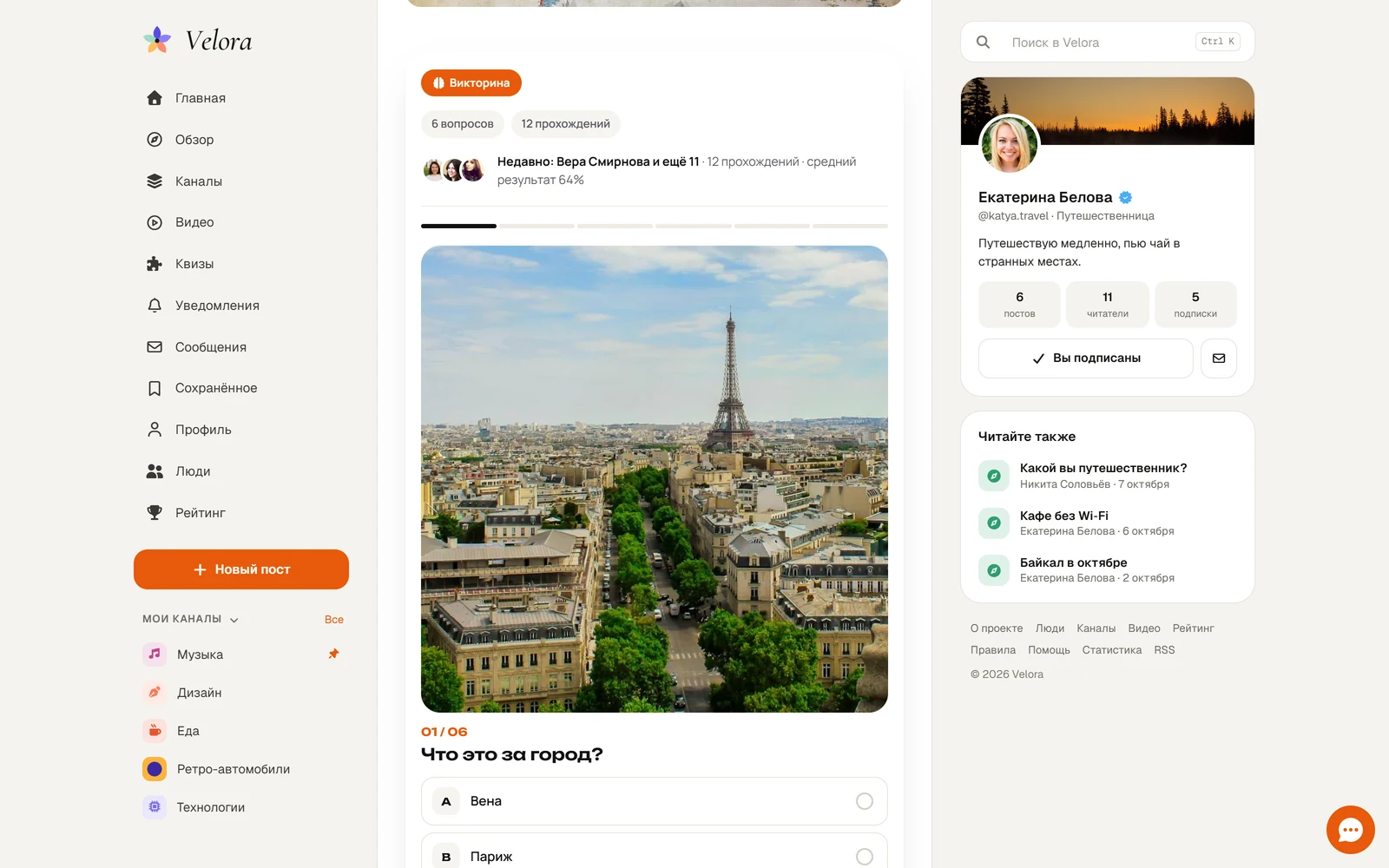
DLE 21 template for a social network or blog platform: feed, stories, follows, profiles with covers, notifications, light and dark themes.
Version 1.27.2 PHP 8.1 — 8.4 DLE 21.0 Documentation Open demo
Velora
  • Multipurpose
  • Light theme
  • Dark theme
  • + Stories and Highlights
  • + Follows, circles and notifications
  • + Profile with a cover
  • + New post in one window

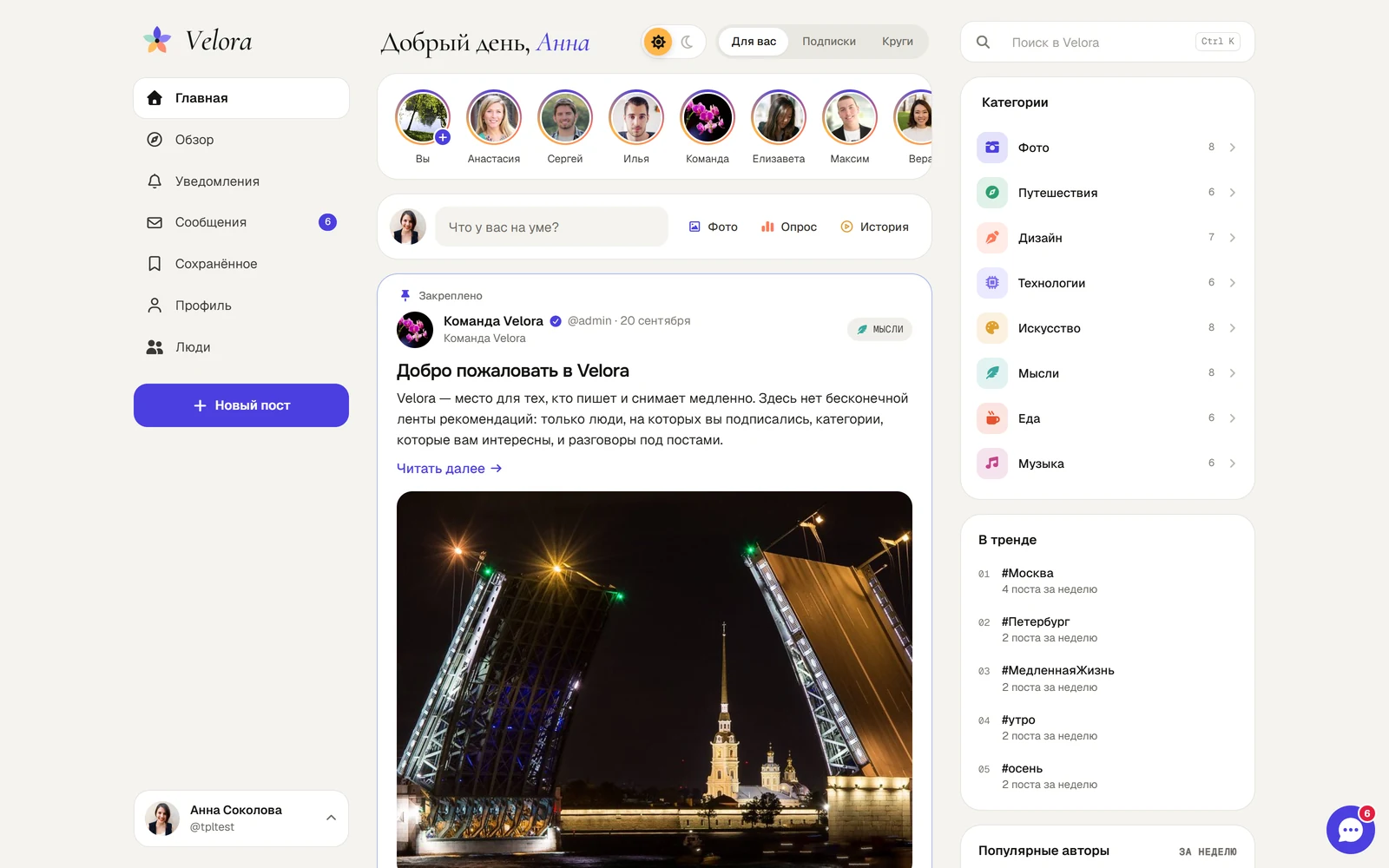
Velora is a DLE 21 template for a calm social network: posts with photos and polls, 24-hour stories, follows, discussions and, as a gift with Extended, the DLE Message PRO messenger with groups and mini-chats; Premium also adds DLE Quiz PRO quizzes. Three columns on desktop, a bottom bar on phones, light and dark themes.

Highlights

  • DLE Pay PRO payments, already built in: install the module and a wallet, VIP with a badge, paid posts and author subscriptions, tips, fundraisers, paid request forms, paid publishing and payouts appear in the Velora style. The lock and price are right in the new post window, money events are in the bell. Without the module the template works as usual.
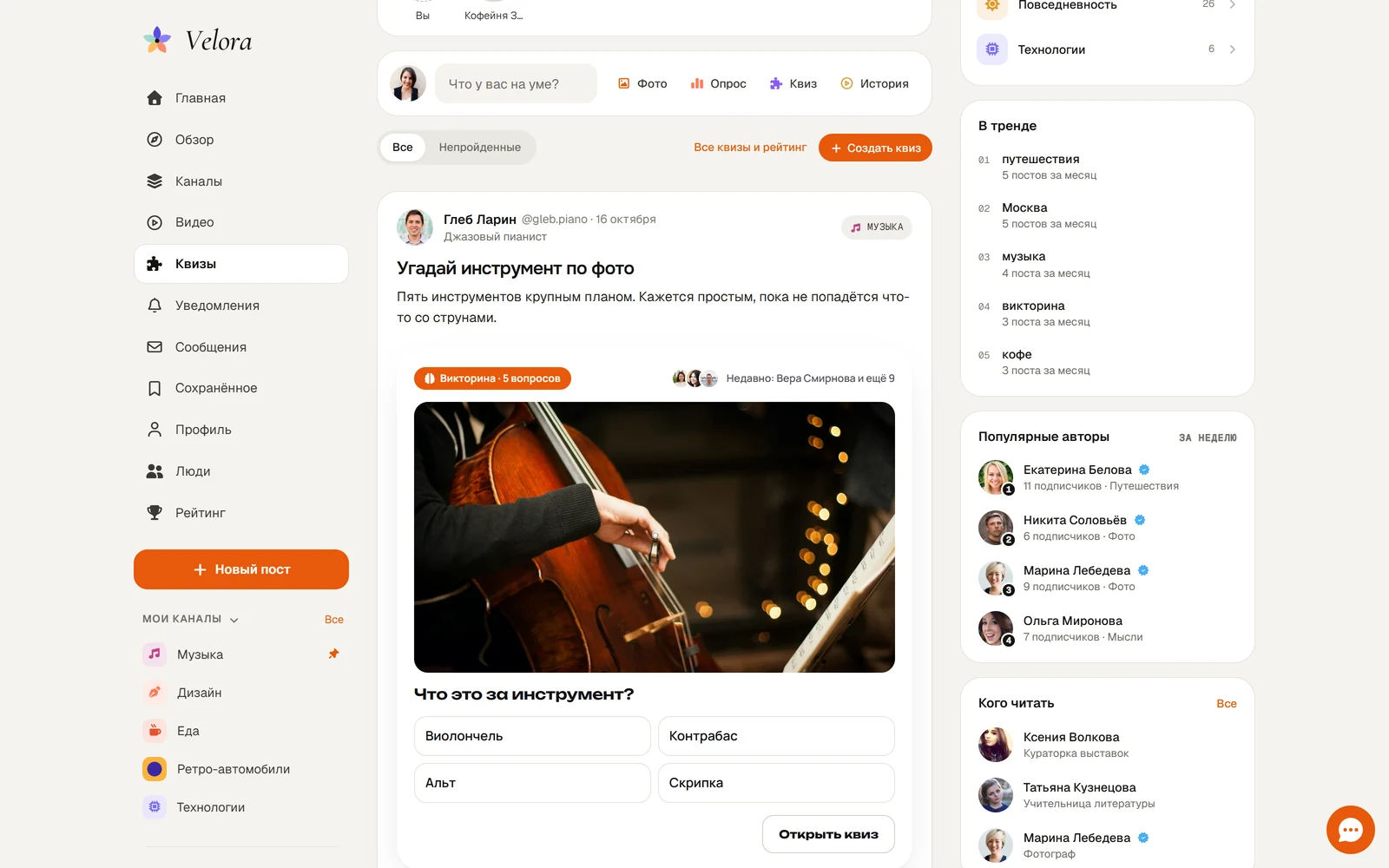
  • DLE Quiz PRO quizzes — already built in: install the module and trivia, polls and «Which one are you» appear in the feed and posts in Velora style, a «Quizzes» tab with «Not played», a «Quiz» button in the post window, badges and played quizzes on profiles. Nothing to set up in the template.
  • Stories like in big social networks: a photo or text on colour, three fonts, “Everyone / Close friends”, a full-screen viewer with pause and swiping, ♥ and replies as private messages, who viewed. Favourite stories are collected into Highlights on the profile.
  • Follows and circles: follow people and categories with a bell, a “Following” feed with reposts, “Circles” — posts from people you follow mutually, “Who to follow” and “Popular authors this week”.
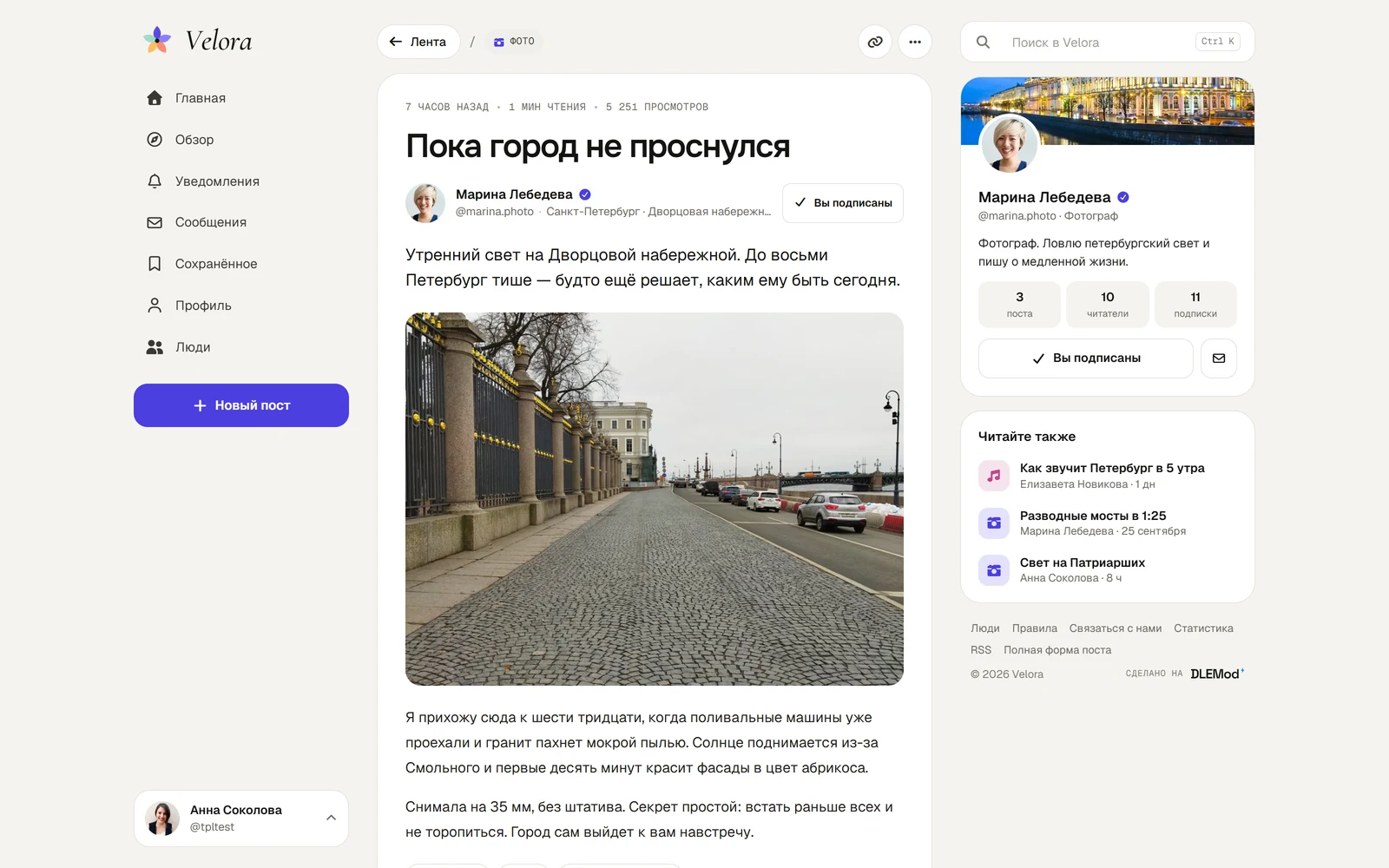
  • Profile with a cover, photo, role, city and link — all edited in one window; a pinned post, Posts / Media / Reposts / Saved tabs, “Followed by Dmitry, Marina and 12 more”, weekly profile view stats.
  • New post in one window: title, text with #tags and @mentions, up to 4 photos, a poll, a place, a category, a feeling or activity ("Watching: Dune") and a post on a colored background, like on Facebook. Your own post can be edited in the same window. Publishing respects DLE group rights and moderation.
  • Appearance without editing code: main colour and your own logo, turning blocks on and off, the right column only on the pages you need, a left menu with your own links and icons, the phone header and category strip. DLE additional fields in the new post window. Your own fonts, a guest invitation with sign-up buttons and a Verified section with a blue badge next to the name.
  • Popular and the site as an app: a tab with the most discussed and liked posts (the home page can open right on it), and visitors install the site on their phone as an icon: it opens without the address bar and shows a neat No connection page offline.
  • Notifications: follows, ♥, comments and replies, mentions, reposts and new posts from authors you ring — with a counter in the menu.
  • Posts with a photo grid and full-screen gallery, polls right in the feed, “Liked by Dmitry and 272 more”, reposts and saving; threaded discussion sorted by Top / New with Enter to send.
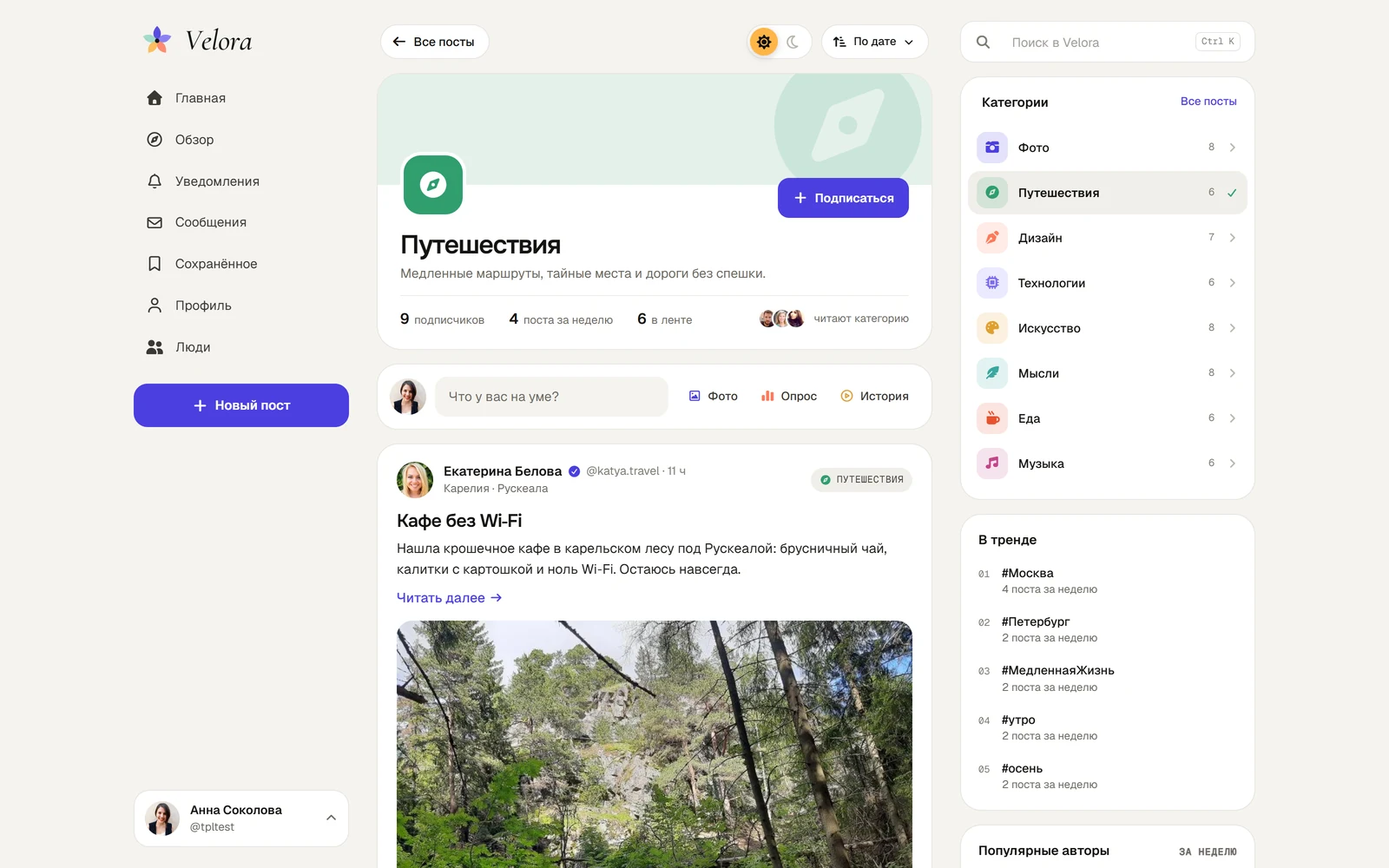
  • Channels: all categories on one page as cards with a follow button. A category with subcategories becomes a section, for example Creativity with Photo, Design and Music, and the whole section can be followed at once.
  • User channels and reactions: members create their own channels inside sections (with colour, icon and picture, reviewed by the administrator), and posts get reactions ❤️ 👍 😂 😮 😢 🔥 instead of a single heart.
  • A community like the big networks: channels get a cover, numbers, popular tags and Fresh / Best / Most discussed / Comments tabs, an author card on hover, achievement badges with tooltips and My channels in the left menu with pinning.
  • Explore with the week’s best and a photo wall, People, Followers / Following, categories with a hero, colour and icon.
  • My statistics for every author: post views, likes, comments, reposts, new followers, profile and story views for 7, 30 or 90 days — a chart, comparison with the previous period, top posts, topics, response time and engagement of each post.
  • The New post window adds video by link (YouTube, VK Video, Rutube) or as a file — large videos upload in chunks, up to 5 files (mp3 and mp4 with a player, archives and documents to download) and people suggestions when typing @.
  • Author ranking and Video: a podium for the top three with medals and badges for the week, month or all time, plus your own place; all site videos in a grid that play in a window right on the page.
  • Site pages: About with live numbers, team and channels, Statistics with a growth chart, Help with FAQ and request topics. Post statistics under every post, and each category can be a feed, a card grid or photo tiles.
  • Run the site without code: group rights (give moderators and journalists only what they need, no admin panel), editorial posts, a Site team badge, your own favicon, analytics and meta tags in the Markup and counters tab, footer links with More and custom links, the same emoji for everyone (Twemoji or Noto), sharing to Telegram, VK, WhatsApp and private messages, Dzen videos.
  • Ads, labels and our own reactions: stories on behalf of an advertiser (logo, name, website, shown for 1 to 30 days), "Made with AI" and "18+ post" labels (photos and videos stay hidden until the reader confirms their age), anonymous posts ("Anonymous" instead of the name, only the site team sees the author, and the author can reply in comments anonymously or under their own name), replies as support, custom badges awarded manually or automatically by a condition (posts, comments, likes, followers, days on the site), with an expiry date, ranks for rating points (your own names, colours and points per action), channel teams (admins and authors), your own site background, block colour and pattern, hand-drawn Velora reactions that look the same on phones, Windows and Mac, with light animation. Search can be pinned to the left menu, clean addresses /about/, /rules/, /statistics/, /feedback/.

Styled pages

Every DLE page: home feed, categories, post, profile and its settings, pop-up profile, private messages as dialogs, search and quick search, tags, favourites, registration and pop-up login, password recovery, full add-post form, statistics, feedback, static pages, polls, print version, site offline, DLE messages.

Bundled plugin

The template comes with the “Velora: extras” plugin — stories, follows, notifications, reposts, profiles with covers and quick posting. No settings page, it doesn’t change site data. Without the plugin the template still works. Open source.

A gift: the DLE Message PRO messenger

Extended and Premium come with a DLE Message PRO licence as a gift (Standard, 1 site); Premium also includes DLE Quiz PRO. Private messages become a messenger in the Velora style: a full-width chats page, mini-chats on every page, groups, photos, files, voice messages, reactions, “typing…” and ✓✓ read receipts. The ✉ button in a profile opens a chat right on the page, and story replies arrive in the chat.

Fonts and Font Awesome icons are bundled, no external requests.

4 plugins included

Installed together with the template and tested with it. Nothing to buy separately.

  • Stories and Highlights

    24-hour stories: a photo or text on colour, a font, Everyone / Close friends, a full-screen viewer, ♥ and replies by private message, who viewed. The best ones go to profile Highlights.

    included
  • Follows, circles and notifications

    Follow people and categories with a bell, Following and Circles feeds with reposts, Who to follow, popular authors of the week and notifications about follows, ♥, replies and mentions.

    included
  • Profile with a cover

    Cover, photo, name, bio, city, link and occupation are edited in one window. A pinned post, a media wall, reposts, a verified author badge and weekly view stats.

    included
  • New post in one window

    Title, text with #tags and @mentions, up to 4 drag-and-drop photos, a poll, a place and a category — the post goes live at once or after moderation, as DLE groups are set.

    included

Screenshots

Click a screenshot to zoom in

Choose a version

“Standard” is the template with its plugins for 3 sites, “Extended” gives 10 sites and gift modules, “Premium” — unlimited sites, gift modules, plus installation and setup on your site. You can move to a higher version later — what you've paid is credited.

Standard
$99
  • Velora template
  • Stories and Highlights
  • Follows, circles and notifications
  • Profile with a cover
  • New post in one window
  • Installation and setup on your site
  • 3 sites
  • Open source code
  • Updates 6 months
Recommended
Extended
$123
Free gift
  • DLE Message PRO DLE Message PRO A messenger instead of DLE private messages: Messenger-style chats, mini chats on every page, groups, photos, files, voi... Standard license for 1 site separately $56 free gift About the module
  • Velora template
  • Stories and Highlights
  • Follows, circles and notifications
  • Profile with a cover
  • New post in one window
  • Installation and setup on your site
  • All Standard features
  • 10 sites
  • Priority support
  • Updates 12 months
Premium
$197
Free gift
  • DLE Message PRO DLE Message PRO A messenger instead of DLE private messages: Messenger-style chats, mini chats on every page, groups, photos, files, voi... Standard license for 1 site separately $56 free gift About the module
  • DLE Quiz PRO DLE Quiz PRO Playbuzz-style trivia quizzes, “Which one are you?” tests, polls and checklists for DLE: quizzes right in the feed card,... Standard license for 1 site separately $62 free gift About the module
  • Velora template
  • Stories and Highlights
  • Follows, circles and notifications
  • Profile with a cover
  • New post in one window
  • Installation and setup on your site
  • All Extended features
  • Unlimited number of sites
  • Personal consultations
  • Updates forever
  • Installation and setup
  • Adapted to your website (including code refinement)

Version history

  1. 1.27.2 current 6 New 3 Fixed

    New 6

    • New setting «Line breaks in post titles»: balanced lines as now, or normal wrapping where a line is filled to the end. Appearance → Home and posts.
    • Clicking the magnifier in the search bar starts the search, like Enter. If the bar is empty, the cursor just goes into the field.
    • VK videos with links like vk.ru/video-… and vk.com/video-… (the ones the Share button gives) are embedded in a post just like vkvideo.ru links.
    • Rating: you can choose where the rank is shown (as now, everywhere except the feed, or everywhere), add an icon before the rank and give points your own name with forms for 1, 2 and 5. By default everything stays as before.
    • Post as the support profile: groups with the new right «Publish posts as support» see a «Post as …» switch in the New post window. Only the administration sees the real author. Works when the Support profile is set.
    • New setting «Attachments in posts»: files can be shown as a noticeable oval button in the site colour with an icon, name, size and download count. Appearance → Home and posts; by default a card, as before.

    Fixed 3

    • An animated GIF added in the New post window is saved as is and moves in the feed and in the post. Before, with DLE image processing turned on (conversion to WebP, resizing), only its first frame was left.
    • When a post can have only one category and it is optional, clicking it again clears the choice, as in multi-category mode. If a category is required, the post will not be sent without it and a hint appears.
    • In the full post there is no more extra space under the audio player or big margins around an ad block in the text: empty paragraphs next to the player and the banner are not shown. Hiding an empty banner with an ad blocker works as before.
  2. 1.27.1 1 Fixed

    Fixed 1

    • On the Channels page, a section with more channels than are shown at once has the «Show all channels of the section» button again. In 1.27.0 the digit 1 was shown instead and the remaining channels could not be opened.
  3. 1.27.0 7 New

    New 7

    • DLE windows on the site can open as Velora windows: confirmations, text prompts, Notify author, Delete article and turning on two-factor sign-in. Turn it on in Appearance → Design → DLE windows; by default everything stays as before.
    • Posts in the Posts tab of a profile can be shown like in the feed, as full cards. In your own profile each card has a Pin button. The Posts in profile setting; compact by default, as before.
    • New Animation of GIF and video setting for avatars, channel icons and covers: as now, respecting the device's reduce motion; always; or only in profiles, posts and comments. GIFs and photos inside posts are not affected.
    • An anonymous post can be chosen at the top of the post window: instead of Visible to everyone, under the name there is a choice of On my behalf or Anonymously, and the checkbox at the bottom goes away. The Anonymous post choice setting; a checkbox at the bottom by default.
    • On the Channels page you can set how many channels of a section are shown at once and turn on search by name and description when there are many channels. By default as before: 8 channels, no search.
    • The channel card can be split: «readers» right under the Subscribe button, and the Fresh / Best / Comments / Video tabs as a separate block before the posts. The Channel card setting; as before by default.
    • The «Made with AI» label can be hidden from search engines: visitors see it as before, but its text is not in the page HTML and the block is marked data-nosnippet. The «Made with AI» label for search engines setting; plain text by default.
  4. 1.26.1 1 New 3 Fixed

    New 1

    • Search results can look compact, like a tag page: section, date, title, the start of the text, counters and a small picture on the right. The page is lighter and opens faster. Turn it on in Appearance → Feed and posts → Search results; by default everything stays as before.

    Fixed 3

    • A channel can no longer be picked as the section for itself: after such a save the site stopped opening. Channels without a section no longer show up in the list of sections. If a site already ran into this, the update moves the channel back to the top by itself.
    • A poll in the feed shows the results if the visitor has already voted. Before, with the DLE cache on, the feed offered to vote again every time, while the full post was right.
    • Poll answer options are centred in their row again instead of sticking to its top.
  5. 1.26.0 2 New 1 Improved 4 Fixed

    New 2

    • A tag page can now look compact, like posts in a profile: section, date, title, the start of the text, counters and a small picture on the right. The page is lighter and opens faster. Turn it on in Appearance → Feed and posts; by default everything stays as before.
    • The title of the «Read also» block under a full post can be changed in Appearance → Feed and posts.

    Improved 1

    • A GIF with a very large number of frames is no longer accepted for an avatar or cover: such a file would slow the page down for viewers.

    Fixed 4

    • If a post has a banner in its text and the reader uses an ad blocker, no empty space is left where the banner was.
    • When the search is in the left column, the Search item no longer shows up in the menu as a second one next to it.
    • The Back button remembers where you came from: from a channel's Video it returns to the channel and from there to Channels, not straight to the home page.
    • In My statistics, in the All posts table, hints appear at the icon in the column header, not over the whole cell.
50 earlier versions
  1. 1.25.0 2 New 1 Improved

    New 2

    • GIF and video instead of a photo: the avatar, profile cover and channel cover can be a GIF or a short MP4 video (up to 30 seconds). Video plays muted on a loop in the profile and on the channel page; in the feed and lists its first frame is shown. A channel icon can be a GIF too.
    • The administrator decides who can do what: in Velora → Rights, groups for each place, and below the table the formats (GIF and video, GIF only, video only), video length and file size.

    Improved 1

    • If Reduce motion is turned on in the system, the first frame is shown instead of the video.
  2. 1.24.0 1 New 1 Improved 3 Fixed

    New 1

    • Image height in posts can now apply to the feed only: in the full post photos are then shown without the limit. The setting is in Appearance → Feed and posts.

    Improved 1

    • Profile tabs now show that they scroll: when they don't all fit, the edge fades out, and on a computer an arrow appears on hover to scroll them. The selected tab moves into view by itself.

    Fixed 3

    • The search window now also closes when you click an empty area, not only with the Cancel button.
    • My statistics: the chart tooltip sits above the selected point and no longer drifts sideways near the chart edges.
    • Channels as a list on phones: the section header lines up with the channels below it, so the icon, text and subscribe button no longer jump around.
  3. 1.23.0 2 New 3 Improved 2 Fixed

    New 2

    • Works with DLE Post Editor PRO: the Full form icon in the New post window carries over the title, text, photos, video, files, category and the 18+ and Made with AI marks (with the module and with the standard DLE form); if a poll, place or anything else the full form lacks is filled in, Velora asks first.
    • The post page no longer repeats the short story: when it is the beginning of the post (as DLE Post Editor PRO builds it), the first paragraph and cover are not shown twice above the text; a photo already in the text is not duplicated even with a custom feed text.

    Improved 3

    • DLE Post Editor PRO blocks in Velora style: two- and three-column photos form an even tile with a shared caption (three columns become two on phones), the button uses the site color, code, callouts and table of contents get Velora's rounded corners.
    • With DLE Post Editor PRO 1.1.0 and newer the full post form stays Velora's own: category tiles, poll, tags, the 18+ and Made with AI marks and the Submit button are in place, the module only replaces the text editor (its buttons form an even row on phones). With module 1.0.0 it is the module's whole form, which also takes the right column's space on desktop, with the toolbar at the top of the window.
    • Additional fields in the full form follow Velora's style: the label matches other fields, image upload is a neat full-width zone, and an uploaded image shows as a card with preview, description and delete.

    Fixed 2

    • Edit on a simple post written in DLE Post Editor PRO opens the New post window again instead of the full form.
    • If a post's text contains a DLE template tag, for example {full-story} in a code sample, the post no longer gets inserted into itself — the tag is shown as written.
  4. 1.22.0 1 New 1 Fixed

    New 1

    • My stats → My rating: current points, rank and place in the overall rating, how many points are left to the next rank (with a progress bar), a points chart for 7, 30 or 90 days with a tooltip for each day, where the points came from in the period (posts, likes, comments, followers, reposts), the full list of ranks and an Overall rating button. Past days are calculated from the dates of posts, comments and follows, and from this version the template saves the score once a day, so the chart shows both growth and drops.

    Fixed 1

    • Administrators can open any user's stats again (/mystats/?user=login) — the page used to fail with an error.
  5. 1.21.0 3 New 1 Fixed

    New 3

    • Appearance → Phone → Profile menu on phones: a new "Everything at the bottom" option. The profile photo stays only in the bottom bar and opens the profile menu (with My profile in it), Messages move to the bottom and Explore to the top. Easier to use with one hand. By default nothing changes.
    • Video: pick a channel — a row of channels that have videos, with counts; All channels returns to the full list. Inside a channel there's now a Video tab next to Fresh, Best and Discussed when the channel has videos.
    • Pretty URLs: /register/, /lostpassword/, /addpost/, /user/login/posts/, /lastcomments/ and /lastcomments/user-id/ (with pagination). Links on the site switch automatically and the old addresses keep working. Requires DLE friendly URLs; the rules are added when the template updates.

    Fixed 1

    • The DLE ad banner tag {banner_name} in short and full stories now works: the banner shows in the feed and in the post (the banner needs "show in news" enabled). Before, the tag just disappeared.
  6. 1.20.0 3 New 3 Improved 4 Fixed

    New 3

    • Admin panel, Channels: the channel menu now has Who manages it and Change owner. One page shows the creator and the team: change a role (admin or author), remove someone, add a new member by login. You can hand the channel to another owner and keep the previous one as an admin or not; both get a notification on the site.
    • A "Short story only in the feed" checkbox in the DLE forms (adding and editing in the admin panel, adding on the site): the short story shows in the feed but not in the full story, which starts right with the full text. Handy when the short story is a teaser and the substance is in the full one.
    • Appearance → Feed and posts: Image height in posts — no limit, 400, 500, 600, 720 px or your own (240–1600 px). Tall photos in a post shrink as a whole and no longer stretch the page, especially with a wide feed.

    Improved 3

    • In the admin channel list the Who writes column shows "creator and team" when the channel has admins or authors.
    • Feed width where there's no column: besides 640, 720 and 800 px you can now set your own width from 560 to 1000 px.
    • Install app in the left menu on desktop: a cross appears on hover and hides the suggestion for 30 days, like on phones.

    Fixed 4

    • The normal pointer (not the text cursor) is now also shown over the Ad mark (the i button keeps the hand), 18+, the post date and the mood.
    • A full post without text (mood or photo only) no longer leaves an empty gap between the author and the buttons for its author.
    • My stats on phones: the date labels under the chart no longer overlap.
    • Checkboxes in site forms: when the label wraps to a second line, the box stays next to the first line.
  7. 1.19.1 2 New 5 Improved 11 Fixed

    New 2

    • The "reply as" choice is now in comment replies too (Reply in threaded comments): a photo with the name above the field, the same choice as in the main form.
    • Admin panel, Rights → Support profile: after saving you see the profile that was found (photo, name, @login) with Open profile and View all comments links. If the login isn't found or the profile is banned, it says so right there.

    Improved 5

    • Channel and profile buttons now sit the same way: on the right under the cover with the same spacing. On phones the channel section text and buttons no longer shift, and on your own profile Edit is the last button, like Follow on someone else's.
    • The "anonymously", "as yourself" and "answered by …" marks now come after the verified badge and "Author". On a support reply the tooltip shows the name and @login of who actually answered, and the name links to their profile (only staff see this). Staff now also see the "anonymously" mark on the post author's anonymous reply.
    • "Are you sure?" questions now open in the site's own window instead of the browser's system dialog: channel team (remove, leave, become author), channel cover, stories and highlights, the verified mark, deleting conversations. In the Velora admin panel these questions and warnings use DLE windows.
    • On phones you can tap the marks (anonymously, as yourself, Made with AI, rank) to read their tooltip.
    • The Discussions page (latest comments, including one person's comments) now shows comments in the same card as under a post.

    Fixed 11

    • The font no longer jumps when you switch themes: the fonts chosen in Appearance are now the same in the light and dark themes.
    • The ring around the selected reaction now follows the emoji's circle exactly instead of sticking out.
    • The admin's comment selection checkboxes no longer move on hover or when ticked.
    • Right-clicking a story no longer opens the browser's Save image menu: on a computer it opens the story's own menu (if there is one), on phones nothing happens.
    • Profile menu: one thin border without a second border or a grey strip at the bottom, and the photo no longer has an accent-colored ring.
    • Story viewer: the ⋯ menu now sits above the ad story's i button and has a visible edge, and Esc closes the menu first instead of the whole story.
    • Over post marks (Anonymous, Made with AI and others) and comment marks the cursor is now the normal pointer, not the text cursor.
    • A rank with a 0-point threshold now has the tooltip "Starting rank for new users".
    • Tooltips: if a module's button already has its own tooltip, the template no longer shows a second one next to it. A tooltip on a button that grows on hover now sits exactly above it.
    • Short story formatting from the DLE editor is now shown in the feed and at the top of the post: headings, alignment, text color and underline, blocks from Formats, tables. Unsafe attributes are still removed.
    • Admin panel, channel list: the Author column is now called Creator.
  8. 1.19.0 4 New 1 Improved

    New 4

    • Badges: built-in badges can have their name, description, icon, colour and condition numbers changed (for example, turn "Fifty posts" into "Twenty posts"). Custom badges can now be awarded automatically too, for posts, comments, likes, followers, days on the site or stories, and a manually awarded badge can have an expiry date or last forever.
    • Share → Send in messages now sends the post right away without opening the chat: the name shows "Sent", and with DLE Message PRO the post arrives as a card with the image, title and author.
    • Appearance: field and tile colour, border colour and thickness (normal, thicker or no borders). If only the block colour is set, fields and tiles inside blocks take its shade instead of staying grey. On sites where a block colour is already set, fields and tiles will take its shade after the update.
    • Comment replies like on VK: the author of an anonymous post taps the photo next to the form and picks whether to reply anonymously or under their own name (without the Author badge, so nobody learns the post is theirs). Groups with the Reply as support right can reply from the support profile, set in the Rights tab.

    Improved 1

    • Labels above a post in the feed (Pinned, Ad, Editorial, Made with AI, Anonymous post) now sit on one line separated by dots instead of stacking, and fit even on a narrow phone.
  9. 1.18.0 2 New

    New 2

    • Ranks for rating points: in the admin panel, Velora → Rating and ranks sets how many points a post, a new follower, a repost, a comment and a like give, and below it the ranks with a name, colour and threshold. The rank badge shows in the profile next to the name, in the author card and on the Rating page, and the profile shows the score in points. Ranks are off by default.
    • Channel team: the channel creator adds people in the ✎ window. An admin can do everything the creator can (edit the channel, post, build the team), an author only posts to the channel, even when not everyone can. The team shows in the channel header as "Run by …", the person gets a notification, and the Channels page marks the channel with "You are an admin of this channel".
  10. 1.17.1 1 New 1 Improved 7 Fixed

    New 1

    • The Adult post, Made with AI, Sponsored post (with the Advertiser, tax ID, erid field) and Editorial post flags are now checkboxes in the DLE forms too: adding and editing news in the admin panel and adding news on the site. You can make a flagged post right from the admin panel. Each checkbox is shown only to groups allowed to use that flag.

    Improved 1

    • Anonymous posts from the author's side: a note under the name says you published the post anonymously, the reply form warns that the reply will be signed "Anonymous", and the author sees their own replies in that post marked "anonymously".

    Fixed 7

    • Post and like counters in the profile, author card and profile popup no longer include anonymous posts: before, the difference from the profile feed or a growing like count could reveal who wrote an anonymous post.
    • Anonymous posts: searching by author no longer counts anonymous posts in the "N results found" line, and replying to or quoting the author's comment in their anonymous post now shows "Anonymous" instead of the login. The author always sees their own anonymous post with their name in the feed.
    • Profile menu in the left column: no more grey rectangle from the shadow around the open menu.
    • Profile button at the bottom of the left column: after closing the menu it had a double border, especially visible in the dark theme.
    • The Back button appeared twice on the Following and Followers pages.
    • The profile no longer shows the login next to the Back button: it is already under the name.
    • Author rating on phones: the author's channel name was cut in the middle; now it takes the whole line and ends with an ellipsis.
  11. 1.17.0 3 New 1 Improved 1 Fixed

    New 3

    • Anonymous posts: an Anonymous post switch in the post window. Instead of the author's name and photo everyone sees "Anonymous"; the post stays out of their profile, followers' Following feed and the author rating, and the author's replies in their own post are signed "Anonymous" with the Author label. Only the author and groups allowed to edit all news see who wrote it. Paid posts, fundraising posts and posts in your own channel cannot be anonymous, since they point to the author. Turn it on in Appearance → Feed and posts; who may use it is set in the Rights tab.
    • Site background and block colour, separately for the light and dark themes, plus a background pattern: tiled or stretched, on the whole site or only the left or right half of the screen; in the dark theme it can be dimmed, kept as in the light theme or hidden. Appearance → Design.
    • Custom badges: the admin creates a badge (name, what it is for, any of 1,400 icons and a colour), gives it and takes it back by login in the Badges tab, and the person gets a notification. The badge tooltip says it is awarded by the site team.

    Improved 1

    • The Show/Hide poster in full post option is now also in the DLE forms: adding news on the site, and adding and editing news in the admin panel.

    Fixed 1

    • The mobile header no longer shifts hue when a custom background colour is set.
  12. 1.16.0 2 New 2 Improved 5 Fixed

    New 2

    • Video files in the New post window: a File button next to the video link. Large files upload in chunks with a progress bar. Formats, size and storage, including S3, come from DLE settings and group rights.
    • The poster at the top of a full post can now be shown or hidden for a single post: a switch in the post window and in Edit. Groups allowed to edit all news see it.

    Improved 2

    • The feed click setting is now split: one for video and one for audio. Your previous choice is kept for both.
    • Stories on desktop: drag the stories strip with a mouse or a pressed touchpad, like a finger on a phone. A normal click still opens a story.

    Fixed 5

    • The New story window now fits laptop screens: fields scroll inside the window and the Publish story button is always visible at the bottom.
    • Files and videos from the post window now get the correct address with DLE external storage.
    • With DLE Pay PRO, a post without text no longer shows the player twice.
    • VK live streams: a live.vkvideo.ru link in the DLE editor's media insert now shows the player in short and full news.
    • DLE editor format blocks (information, warning, error, blue background, borders) no longer glare in the dark theme: the background is muted and the text is readable.
  13. 1.15.2 2 Fixed

    Fixed 2

    • Feed: avatars and images no longer disappear after “Show more” on hosting with the PageSpeed accelerator.
    • Photo tiles: the post now opens when you click anywhere on the tile, not only on the title.
  14. 1.15.1 5 Fixed

    Fixed 5

    • Radio and other .m3u8 audio streams now start in browsers that cannot play them natively, for example on Windows 7. The DLE 21.0 player loads the required library for video only; the template now does it for audio too.
    • Video added to the short story with an iframe code now appears in the feed and in the post. The Edit window no longer removes it on saving.
    • VK live streams: a live.vkvideo.ru link in the player now opens the VK player.
    • Photo tiles: a post without an image now shows the site logo or icon instead of an empty square. Quiz posts show their image, and video fills the whole tile.
    • The page of a non-existent post no longer shows the service text {vl-related}.
  15. 1.15.0 3 New 2 Improved 3 Fixed

    New 3

    • Built-in payments with DLE Pay PRO: install the module and everything appears in the Velora style. Wallet and top-ups, VIP with a badge and no ad stories, paid posts and subscriptions to an author or channel (a lock right in the new post window), author tips, post promotion, transfers, payouts, fundraising with a “Fundraiser” label in the feed, promo codes, friend invitations, paid request forms and paid publishing with the price in the post window. Money events arrive in the bell, on the Money tab. Without the module the template works as before.
    • “Advertising post”: a switch in the post window and an “Advertiser, tax ID, erid” field. The feed, full post and cards show an “Ad” mark with an “i” icon. Who can use it is set in the admin panel.
    • New settings: “Poster in the full post” (show or hide), “Clicking video and audio in the feed” (plays in the feed or opens the post), and a group right “Stories for everyone”.

    Improved 2

    • A back button now appears on Explore, Channels, People, Notifications, Messages, My statistics, Followers and About.
    • Badges: the admin list now includes “Verified profile” and “Site team” with a counter and a link to the list, and they have clear descriptions in profiles. If a post menu has only “Report”, a flag shows instead of “…”.

    Fixed 3

    • The “Install app” button no longer jumps or shifts the menu when moving between pages.
    • The mood line on phones no longer runs past the edge or under the channel icon; service links on the left are no longer repeated at the bottom of pages; pagination arrows have no double border; tooltips and volume on feed audio are no longer cut off.
    • Logging out could hang for visitors with the app (PWA) installed. Logout now opens right away.
  16. 1.14.1 1 Fixed

    Fixed 1

    • DLE audio and video player in the dark theme: the player and the track list are now dark like the site (they stayed white because of the DLE player theme setting). The selected track is easier to read in the dark theme.
  17. 1.14.0 2 New 1 Improved

    New 2

    • Site as an app (PWA): visitors install it on a phone or computer, it opens from an icon without the address bar, and offline it shows a neat No connection page. On phones an Install bar appears from the third visit (it can be hidden for 30 days), on computers there is an item in the left menu. On/off switch, name, label under the icon and your own icon are in Appearance → Phone → App (PWA).
    • Popular tab next to new posts: posts that get the most comments, reactions and views (points for a comment, reaction and view are adjustable, 2, 1 and 0.1 by default; period from a week to a year). The home page can open on popular posts: then new posts move to the second tab and pinned posts stay on top. Settings: Appearance → Feed and posts.

    Improved 1

    • The guest card text on the home page (Here people write and shoot slowly… with Log in and Sign up buttons) is now edited in the admin panel: Appearance → Guests → Guest block on the home page. Empty means the template text.
  18. 1.13.9 1 Improved

    Improved 1

    • With DLE Quiz PRO 1.2.0: the Quiz button in the What's on your mind box and in the new post window follows the module setting Quiz button in the Write window. When it is off, quizzes are created only in the Quizzes section (moderators always see the button).
  19. 1.13.8 1 Fixed

    Fixed 1

    • Video uploaded as a file to the built-in DLE player plays again in posts loaded with Show more; before, if the first feed page had no such video, the player did not appear.
  20. 1.13.7 1 Fixed

    Fixed 1

    • When DLE lazy loading of images is on, posts loaded with Show more show their photos and videos again; before, only the text remained. The same applies to everything Velora loads without reloading the page.
  21. 1.13.6 1 New 3 Improved 4 Fixed

    New 1

    • A Like or a reaction can now be removed: tapping the heart under a post again takes it off, the count goes down and the author's notification disappears. On your own post the Like button is inactive: you cannot like your own posts.

    Improved 3

    • Guest invitation: after Remind me later or the cross, a hint "We have hidden our invitation for now, but we are really waiting for you" appears, like the social network plaque. Notification plaques on phones are now as wide as their text instead of half the screen, and no longer break a sentence into short lines.
    • Reporting a post, comment or message now uses a Velora window instead of the DLE one: quick reasons (spam, insults, scam, inappropriate content, other), a field for details, and an e-mail field for guests. The report goes to Complaints in the DLE admin panel as before; DLE's answer (for example "already sent") is shown as a hint. On phones, Velora window titles now line up with the text.
    • With DLE Message PRO 1.6.0: the messenger shows the same badges as the site, the blue Verified and Site team in the site color; a story reply arrives as a story-style card with the story author's name and photo on top.

    Fixed 4

    • The hint on the check mark next to a name no longer shows "N people have it": only the description and "Learn about verification". How many people have the badge is shown in the profile badge row.
    • Ad story window: the Show for choice (1, 3, 7 or 30 days) now uses the same buttons as Who can see: the selected period is dark, the others light, text centred, all four in one row on phones.
    • Channels: when a site has no sections (categories with subcategories), there is no longer an extra All channels heading above the channels. In a channel card the followers · posts line wraps neatly, with no dot at the start of a line. Tab switches and chip rows fade on the right only when they really do not fit.
    • Help: the request topic now has a shorter name, Verify profile, so on desktop all topics sit in two even rows. On phones the topic buttons stretch to the full row width, with no ragged edge. The email subject for the administrator has not changed.
  22. 1.13.5 1 Fixed

    Fixed 1

    • Category and channel covers are visible again: after updating to 1.13.3–1.13.4 the header was empty instead of the cover, and a newly uploaded cover was saved but not shown. Saved covers are intact, nothing needs to be uploaded again.
  23. 1.13.4 1 Fixed

    Fixed 1

    • After updating to 1.13.3, a site where the Rules or Statistics addresses had already been changed in the DLE friendly URL settings (for example to /rules/) showed the home page instead of every page. The update now removes duplicate addresses itself, checks the friendly URL rules and keeps only working ones; nothing to configure, the site works right after the update.
  24. 1.13.3 9 New 3 Improved 13 Fixed

    New 9

    • A Link a social network to your profile banner at the top of your own profile, shown when social sign-in is enabled on the site and the person has none linked. Link opens the settings at the right place; the cross hides the banner for 3 days with a hint where to find linking. It can be turned off in Appearance → Blocks.
    • “Made with AI” label: the post window has a “Made with AI” switch so the author can mark a post generated by or written with a neural network; the label shows above the post in the feed and on the post page and can be changed when editing. It can be turned off in the admin panel (Appearance → Feed and posts).
    • Velora's own reactions instead of emoji: 10 drawn icons (heart, like, haha, wow, sad, fire, bravo, thinking, angry, hooray) that look the same on phones, Windows and Mac with no system dependency. Admin panel, Reactions: Colorful or Site color style and a light animation (the heart beats, the fire flickers, the tear rolls) toggled by a switch; visitors who turned off animations in their system see static reactions.
    • Sponsored stories on behalf of the advertiser: with the Sponsored box ticked, the story window takes the advertiser's logo, name and site plus how long to show it (1, 3, 7 or 30 days). The story appears with their logo and name and opens their site on tap; it is not shown in the publisher's profile, archive or Highlights. When the time is up the ad is deleted completely along with its files and views. Admins see at the bottom who published it, until when it runs and how many views it has.
    • Search can be pinned to the left menu: Appearance → Menu and columns → Search position. Under the logo it stays visible while scrolling and on screens without the right column, and the right column starts straight with its blocks. By default search stays on the right as before.
    • Profile on phones, tablets and without the right column: Statistics, Badges, Writes about and Similar no longer disappear, they show up as tabs next to Posts and Media. On wide screens they stay in the right column as before.
    • “18+ post” label: the post window has an “18+ post” switch. Photos and videos of such a post are blurred in the feed, category tiles and grid, on the post page, in the profile Media tab, Explore and Video until the reader taps Show and confirms they are 18 (remembered on the device). Social previews show no post image. The label can be turned off in the admin panel (Appearance → Feed and posts), and the Rights tab sets which groups may use it.
    • Help: a new request topic “Profile verification” with a ready message template (who you are and how you can prove it). The “Get your profile verified” link in the blue badge tooltip and in the FAQ opens this form directly.
    • With DLE Message PRO: the blue check mark of verified profiles shows in chats, Share → Send in messages sends a post card with its image, and a story reply arrives as a card with the story photo.

    Improved 3

    • Clean service page URLs like the rest of Velora: /about/, /rules/, /statistics/ and /feedback/ instead of about.html, rules.html, statistics.html and index.php?do=feedback, in the footer, login window, registration and the badge tooltip. The canonical URL of these pages is updated too, and old addresses still open. If the site already has a category with the same name, its address is left alone.
    • Help: the Recipient field is hidden by default and the message goes to the administrator (the choice can be brought back in Appearance). The captcha image and the code field are now the same height and on one line.
    • DLE Quiz PRO quizzes: Velora no longer restyles the quiz itself, so it looks as designed in the module, in Velora's color; quiz buttons get the site color right away, with no flash on load.

    Fixed 13

    • Admin panel, Appearance → Menu and columns: footer links are now a separate DLE-style list with the name, Show (Always / Under More / Hide) and a ☰ menu with Up, Down and Delete link. Previously on wide screens the names overlapped the buttons.
    • New story: text can span several lines (Enter for a new line, up to 200 characters), the field grows with the text and the lines are kept in the story. The link hint is now https://site.ru/. Sponsored story fields are now white with a border and visible with any site color.
    • Story with a photo: the text on the site now looks the same as in the new story window, with the same font, size and position. Long text no longer goes under the link button, either in the window or on the site.
    • Share on posts and the link button in the profile now use a curved arrow, as in VK, instead of an upload icon; the profile button has the tooltip Copy profile link.
    • The back button at the top of pages now leads where you came from on every page and is labelled with that place: Channels, the author's name, Subscriptions, or the home tab as it is named in the settings. Before, the channel page always led home. If you came from outside the site, it says Home.
    • The team badge is now called Team <site name>: its tooltip shows how many people have it, Become part of the team… and More about verification. The blue Verified profile count no longer includes team members. Help now explains the two checkmarks and how to get them.
    • Save and the number of people who saved are now one button: shared hover highlight in the feed and on the post, and clicking the number also saves or removes the post.
    • The new story window on phones no longer jumps while scrolling: the preview shrinks smoothly and the fields stay in place, so text, link and background are easy to set.
    • Reactions under a post are one button: the most frequent reactions and the count, without your own reaction repeated next to it. Your reaction comes first and the button is highlighted when you reacted.
    • Text, photos and videos from a hidden [hide] block no longer leak into feed previews, Media and thumbnails for users who are not allowed to see the block.
    • Group rights: “Delete other people's stories” now works on the site — viewing someone else's story, the ⋯ menu has “Delete story (moderation)”. “Create channels without a section” now shows the “No section” option in the channel window even when it is turned off for everyone.
    • Share → Send in messages: verified profiles and site team members now show their badge in the people list, like in @mention suggestions.
    • Profile menu → Settings always opens your own profile. Previously admins and moderators on someone else's profile page got that person's editor.
  25. 1.13.2 1 Fixed

    Fixed 1

    • Share → Send in messages: on desktop the window closed instead of showing the people list, and on tablets and phones the DLE Message PRO chat did not open. Now the chat with the chosen person opens with the post link already in the field (requires DLE Message PRO 1.2.0).
  26. 1.13.1 16 New 18 Fixed

    New 16

    • Dzen videos: paste a regular video link (dzen.ru/video/watch/…, shorts) or an embed link in the post window, and the post gets the Dzen player, while the Videos section shows it with a cover.
    • New "Markup and counters" tab in Velora settings: code for <head> (Yandex Metrica, Google Analytics, verification meta tags, site-wide Open Graph, phone icons) and code for the end of the page (chats, pixels, widgets). No template file edits, kept on updates.
    • Your own site icon (favicon) in Appearance: PNG, SVG or ICO. A square PNG also becomes the phone home-screen icon (iPhone, Android). "Restore default" brings back the Velora icon.
    • Velora admin settings are now laid out like DLE "System settings": a short one-line top menu, and Appearance split into tabs Design, Feed and posts, Menu and columns, Stories, Guests, Phone, with a settings search. User channels and their settings are under one "Channels" item. All saved settings stay as they were.
    • Next to the Save 🔖 icon under a post: how many people saved it (who exactly is not shown). Your own save shows right away, others within 10 minutes. Can be turned off in "Feed and posts".
    • A Share button under each post, next to repost: copy the link, send to Telegram, VK, WhatsApp, OK, X or to a private message on the site — pick a person and the chat opens with the link in the input. On phones it is a bottom sheet with "More…" for other apps.
    • Two profile badge types: "Verified" — a blue check, and "Site team" — a check in the site color, so staff stand out at once. The type is chosen when marking in the admin panel or with the profile button and can be changed any time. The badge, tooltip and card show the right type everywhere: posts, comments, profile, lists.
    • "Editorial post": the post window gives staff a switch (on by default for chosen groups); such posts get an "Editorial post" label in the site color while the author stays the author. Who can use it is set in "Feed and posts".
    • "Reply" in a discussion now puts @username and a comma into the field, like on VK: it is clear who the reply is for even deep in a thread, and the person gets a notification. The mention in a just-sent reply becomes a profile link right away.
    • Opening a link to a comment (from Notifications, Mentions or latest comments) smoothly scrolls to it, softly highlights it in the site color and slowly fades out.
    • The "About" block in Velora style: posts, comments and ratings as tiles (tap to open the author's posts or comments), below — last seen, group and sign-up date with icons. Duplicate name and city removed.
    • Rights tab in Velora settings: choose which DLE groups can manage channels, mark Verified and Site team, edit other profiles, post sponsored stories and links, delete other people's stories and see stats of other people's posts. Moderators or journalists get what they need without full admin access.
    • Emoji style in Appearance → Fonts: system, Twemoji or Noto. With Twemoji or Noto emoji look the same for everyone on Mac, Windows, Android and any browser, including flags that Windows lacks. On phones the emoji picker no longer slides under the bottom menu.
    • Footer links (About, Rules, RSS and others): in Appearance each one can be Shown, put under More or Hidden, reordered with arrows, and you can add your own links (Telegram, terms, contacts). The More button works wherever the links are: right column, left menu and the bottom of the page on phones.
    • Social networks in profile settings: instead of round icons and a «vkontakte 🗑» line, buttons like in the sign-in window. Each network shows whether it is linked, with Link or Unlink; after unlinking the Link button appears right away.
    • Edit post window: the post's videos, photos and files are now shown as tiles (videos with their cover), each can be removed with a cross and brought back. A video-only post no longer opens empty and saves without text.

    Fixed 18

    • The back button at the top of a page now leads where you came from and is labelled with that page: "← Explore", "← Notifications", "← Gleb Larin", instead of always "← Feed". Going back opens the same page at the same spot.
    • The home tab above the feed is now called "New" instead of "For you": it shows all site posts by time, not a personal selection. Pick the name in Appearance → "What is on the home page": New, All posts, Feed or Fresh.
    • The site no longer jumps sideways in browsers with a permanent scrollbar (Opera, Chrome and Edge on Windows): space for the scrollbar is always kept, on short pages and when windows open.
    • New story on a phone: the preview stays on top while you fill in the link and other fields, so you see how the link button will look right away.
    • "New post" window: channels inside a section can be picked again. Tap a section to show its channels below; tap it again to close the list.
    • The "What's on your mind?" bar is back on your own profile when DLE Quiz PRO is installed, along with the profile role and other blocks that disappeared there.
    • On the profile, posts on a colored background are shown with it, and the feeling or activity is shown under the date, as in the feed. A post without a title no longer repeats its text twice.
    • When an administrator edits someone else's post, the "Edit post" window now shows the post author's avatar and name instead of the administrator's.
    • "What are you doing": the hint in the "What exactly?" field now matches each activity (Reading, Cooking…). When reopened, the chosen activity and its hint stay in place.
    • The user's site group is no longer shown under their name, only what they do or their city. The name and the "What do you do" field no longer accept "Administrator", "Moderator" or site group names, so nobody can pose as the team.
    • The tooltip on a post date shows only the publication date and time, without the view count: views are already shown under the post.
    • Tooltips under a post: ♥ shows "Reactions" ("Like" if reactions are off), repost shows "Reposts". The tooltip no longer hides under the reaction picker.
    • New post window: icons now go Background, Mood, Photo, then as before; the Aa icon is smaller and no longer stands out.
    • Post and profile stats: the day bar tooltip now reads «21 October: 4 views» instead of «21.10: 4». On phones it opens with a tap, and zero days can be tapped too.
    • Guest invitation: the title and text now match the sign-in window, same font, centered. On narrow phones the site numbers and buttons no longer spill out of the window.
    • Profile, right column: «No posts yet» in the Writes about block is now aligned with the title.
    • Sign-in and invitation windows: the colored background under the moving faces now blends into the window, with no visible band on bright screens; lower avatars and their shadow are no longer cut off.
    • Edit on a formatted post (created in the full form) opened an empty Add post page. It now opens editing of that post with its text.
  27. 1.13.0 4 New 5 Improved 2 Fixed

    New 4

    • Mood and «what you are doing», like on Facebook: a smiley in the post window opens a picker — joy, inspiration, tiredness… or «Watching», «Reading», «Listening», «Travelling» with your own caption; shown next to the name, and you can post it even without text
    • «Edit» opens the same window as «New post»: text, title, category, place, mood and background change in one click; photos, videos and files stay
    • Appearance: the theme switch and service links (About, Rules, RSS…) can be pinned to the left menu, and unneeded links hidden
    • Channels: a «My channels» tab with the channels you created, or a «Create channel» button if there are none

    Improved 5

    • The category in a new post is now optional, like on social networks: without it the post goes to the main feed; it can be made required in Channel settings
    • Notifications look the same: DLE messages («Saved», form errors) appear as the same notices as the template’s, where chosen in settings
    • Post backgrounds are set separately from story backgrounds; text on a light background (and a light image) turns dark
    • Login window: buttons in social network colours, the whole button highlights, a running strip of member faces, no extra caption on top
    • Stories: the new story window shows the ad marks («i» and the caption at the bottom) as they will look on the site

    Fixed 2

    • The hover card for a profile or channel shows an image cover, including from external storage (S3); «What’s on your mind?» shows on your own profile even if composer.tpl was changed
    • The «Ad» and «You created this channel» hints no longer duplicate as a pop-up notice on desktop; the «Quote» button is removed from comments
  28. 1.12.0 2 New 1 Improved 2 Fixed

    New 2

    • Posts on a coloured background, like on Facebook: an «Aa» button in the post window, short text in large letters on a colour or image in the feed and the post; the same backgrounds as stories
    • A link in stories: a «Link» field and your own button text, a «Go» button at the bottom of the story; who can add links is set in Appearance → Stories

    Improved 1

    • Video: [video] with a VK, YouTube or Rutube link plays in the service’s own player; on the Video page uploaded and VK videos have a cover

    Fixed 2

    • Stories: the preview in the new story window no longer stretches, ad marks no longer cover the Views panel and are not hidden by ad blockers
    • The profile post list shows an image even if it is set only in the «Poster» extra field; a custom category image without stripes at the corners
  29. 1.11.0 2 New 5 Improved 1 Fixed

    New 2

    • A new login window: social login buttons enabled in DLE come first, then «Sign in with login» (or e-mail) and «Not with us yet? Sign up»
    • A «Section can be followed like a channel» setting: when off, sections with channels have no «All posts» and «Follow», the section only groups channels

    Improved 5

    • Your own channel in the channel list is marked with an icon next to its name and a «You created this channel» tooltip, channel descriptions no longer shift
    • New post: the selected category shows a cross so it is clear how to remove it; if only one category is available, it is selected right away
    • Stories: all backgrounds are visible at once without scrolling, dark ones stand out in the dark theme; the ad story option is a clearly visible card
    • Guests in the discussion see «Want to share your opinion? Sign in or sign up to comment» instead of the DLE service message
    • The verified badge in the badge row: «Get your profile verified» and a «Verification passed» mark, like the other badges

    Fixed 1

    • The verified profile badge in the @mention suggestions now matches the one on the site
  30. 1.10.0 1 Fixed

    Fixed 1

    • Fixed a few bugs
  31. 1.9.1 1 Fixed

    Fixed 1

    • Fixed a few design issues
  32. 1.9.0 7 New 1 Fixed

    New 7

    • DLE Quiz PRO right inside Velora: trivia, polls and «Which one are you» in the feed and posts in the template style, a «Quizzes» tab with «Not played», a «Quizzes» menu item, a «Quiz» button in the post window, quizzes and quiz badges on profiles. Just install the module, everything turns on by itself
    • A beautiful sign-up page: about the project, member faces, what a profile gives, site numbers
    • Stories: who can post them, default font, your own backgrounds (colours and images) from the admin panel, an ad story with an «i» badge, an «Ad» note (erid) and a caption at the bottom
    • The profile menu is set up in the admin panel: order, which items to show and their names; shorter by default — Profile, Settings, Messages, Saved, New posts
    • The «Site appearance» theme switch on every page and for guests, a yellow sun and a tooltip
    • The feed can show post text only (N characters, no formatting or files), and a photo click can open the post instead of the gallery
    • About page: the site logo in the «Who we are» block

    Fixed 1

    • The «File» button in the post window lights up when a file is attached; the «sign in to comment» note in the discussion is compact now
  33. 1.8.1 7 Fixed

    Fixed 7

    • Avatars, covers, stories and channel images are saved the way DLE itself does: to the selected storage (e.g. S3) and in the format from Image processing (WebP, AVIF, TinyPNG)
    • The profile menu in the left menu always fits on screen: it opens where there is room and scrolls if there are many items
    • Clicking an author’s @login opens the profile instead of the old DLE window
    • Video: VK Video, Rutube and Vimeo clips now have a thumbnail
    • After creating a channel you land on the channel itself, not the home page
    • Channels as a list: the «Your channel» label sits neatly under the name
    • Small things: the character counter in the post window appears near the limit, «Edit and delete» fits one line, «Full post form» stays only in the post window, large headings are aligned with the text
  34. 1.8.0 3 New 3 Fixed

    New 3

    • The profile block in the left menu can be placed at the bottom, above the menu items or above «My channels»
    • The Channels page as tiles or as a list: icon, name, description, subscribers and the button in one row
    • The blue badge card is simpler: the verified caption, or «The author’s profile was verified by the … administration» when there is none; normal cursor

    Fixed 3

    • After sending a comment the page no longer jumps to the top of the article: the new comment stays on screen
    • Photo upload in comments: buttons, percent and size in one tidy row, both buttons visible on phones
    • About page: hovering the blue badge in «Team» no longer opens the author card on top; «+N this month» uses the site colour
  35. 1.7.0 5 New 3 Fixed

    New 5

    • Verified profile: hovering the blue badge shows a card styled like the badges (how many people have it, caption, a «Learn more» link to the Help answer); the badge itself is now also in the profile badge row
    • Custom tooltips across the site: they appear instantly and look the same in every browser
    • Scrollbar in the site colour (or neutral, or browser default) — in Appearance
    • The «What’s on your mind?» box on your own profile above your posts; if the author has one own channel, it is preselected
    • Where the right column is hidden: feed width 640, 720 or 800 px and a choice where its links go — page bottom or the left menu (first four shown, the rest under «More»)

    Fixed 3

    • Tables in post text: the border fits the cells, wide tables scroll on phones, words are no longer split
    • A Highlights collection can be deleted from its edit window; a collection whose stories were all deleted disappears by itself
    • The author hover card for guests is no longer counted by DLE as a failed login attempt (previously, after a few hovers, login from that address was blocked)
  36. 1.6.3 1 New 2 Fixed

    New 1

    • Verified authors: a public caption shown to everyone when hovering the blue badge; the admin-only reason; both can be edited in the admin panel and right on the profile

    Fixed 2

    • The guest invitation closes only with Remind me later and ×, not with an accidental click outside
    • Search in the left menu is now a regular item in the menu editor: it can be turned off or moved; shown where there is no right column with search
  37. 1.6.2 3 Fixed

    Fixed 3

    • The first comment on a post appears inside the discussion, the page no longer jumps
    • Reply to a comment: photo, @mention and emoji like the main form, Enter to send, clear buttons
    • The photo upload panel in comments no longer falls apart
  38. 1.6.1 1 Fixed

    Fixed 1

    • Velora admin: icons in the Badges tab are visible again, checkboxes in the Badges and Reactions tabs use the DLE style
  39. 1.6.0 11 New 1 Fixed

    New 11

    • Logo: SVG upload, a separate logo for the dark theme and a size choice (three presets or your own)
    • Default theme for new visitors: as in the system, light or dark
    • Position of site notifications: top or bottom, left, right or centre
    • Your own blocks in the right column: ads, widgets, any HTML — on chosen pages, at the top or bottom, optionally on phones too
    • Without the right column the menu and feed stay in place, so the site does not jump between pages; a centred feed is also available
    • An administrator can change the name, description, icon, colour and picture of any category right on its page
    • A new verified badge next to the name everywhere, including comments; a Verified section in the admin panel: the list, who marked and when, adding and removing, your own profile too
    • Guest invitation: a window about the project with site numbers, member faces and Sign up and Log in buttons after N minutes or N pages, with Remind me later
    • Fonts without editing code: six presets for the site name, headings and text, or your own WOFF2, WOFF, TTF, OTF file
    • A story reply arrives in private messages with the story picture and a link that opens the story itself on the site
    • Search in the left menu on pages without the right column

    Fixed 1

    • Story viewers: the person card no longer pops up and gets in the way of scrolling, names are visible, unregistered guests are shown as a separate line
  40. 1.5.1 2 Fixed

    Fixed 2

    • Help: the icon of the selected request topic is visible again
    • The frame of the active left menu item is no longer cut off at the edges
  41. 1.5.0 8 New 6 Fixed

    New 8

    • New Appearance tab in the admin panel: the main site colour (presets or any colour) and your own logo
    • Blocks can be turned on and off: greeting, feed tabs, stories, the new post box on desktop and phone, Authors of the week, My channels, right column blocks
    • The right column only on chosen pages: home, categories, full post, profile and more; where it is off, the feed is centred and search moves to the left menu
    • The left menu is configurable: order, hiding items, own titles and icons, own links
    • Phone: the header hides on scroll, stays on top or scrolls away; the category strip has icons, shows on chosen pages and can stick
    • DLE additional fields in the New post window: text, list, yes/no, date; required ones right away, the rest under More
    • A notification when an administrator changes your profile
    • Channels: main channels on top, large sections folded with a Show all button

    Fixed 6

    • A right column taller than the screen now scrolls with the page to the end
    • On short pages the footer sits at the bottom without empty space below
    • A vertical poster in the full post is shown whole, without cropping
    • Badge tooltips in the rating are no longer cut off
    • Trending: all tags look the same
    • Category layout: the preview shows every icon
  42. 1.4.3 1 Fixed

    Fixed 1

    • Category layout in the admin panel: any of 1375 icons with search by name, any colour and a real icon preview
  43. 1.4.2 4 New 2 Fixed

    New 4

    • Own icon and colour for any category in the admin panel: Velora, Category layout tab, with a preview
    • Emoji in comments: a smiley button next to @
    • Polls in the New post window have a question field, and the question is shown above the options
    • An administrator can change any user's photo, cover and details right on their profile

    Fixed 2

    • A custom category picture has the same size everywhere and fills the icon completely
    • Category descriptions are shown longer in the channel header and on the Channels page
  44. 1.4.1 1 New 5 Fixed

    New 1

    • Own icons and colours for Culture, Politics, Economy, Incidents and Video categories

    Fixed 5

    • Icons and template fonts are visible again on Apache hosting (the server refused to serve font files)
    • Channel tabs Fresh, Best and Discussed switch everywhere, including after Comments
    • Pinning a channel in the left menu no longer shows an error about a post
    • Wide pages (Video, Ranking, Messages, Statistics and others) no longer shift the menu and columns when you navigate
    • Best posts of the month on the Statistics page: cards no longer stick together or overflow the edge
  45. 1.4.0 7 New 6 Fixed

    New 7

    • Author ranking: a podium for the top three with medals and badges, places up to 50, week, month and all-time periods, growth versus the previous period and your own place
    • Video section: all site videos in a grid with covers, playback in a window right on the page with next and previous, New and Popular tabs
    • About page via the static-about template: header with author photos and a Contact us button, live site numbers, your text, How it works, Team and popular channels; the link appears in the footer automatically
    • New Statistics page: site numbers, yearly growth chart, authors of the month, active channels and best posts; Help page with FAQ and a request topic picker
    • Post statistics: views in the feed, views, likes, comments and reposts under the post; engagement and weekly views for the author and administrators
    • Category layout of your choice: feed, card grid or photo tiles, set per category in the admin panel
    • About, Help, Statistics, Ranking and Video pages open full width, without the right column

    Fixed 6

    • Footer links are now available on phones: About, Rules, Help, Statistics, RSS
    • Edit in the post menu opens the template form with tags, photos and poll, for administrators too; DLE quick edit and delete stay as a separate item
    • Photo-only posts no longer show the photos twice on the post page; already published posts are fixed automatically
    • The image from an additional field (Poster) is always shown first in the feed and the post, even when the text has photos; photos from the continuation are no longer repeated at the top of the post
    • Author and channel hover cards open next to the pointer and stay on screen; Message from the card opens a single chat window
    • Fixed the Channels page header, profile menu corners and menu highlighting on the Help page
  46. 1.2.0 4 New

    New 4

    • Community-style channel header: cover (changed by the channel author or the administrator), followers, posts, comments and likes, the channel's popular tags and tabs Fresh, Best, Most discussed and Comments
    • Hover cards: for an author — cover, bio, posts, followers, following, likes, badges and follow, bell and message buttons; for a channel — cover, description, numbers and a Follow button
    • Achievement badges: First post, Star of the week, Author of the week, A thousand hearts and seven more; awarded automatically with a notification, shown in the profile and the author card, the tooltip tells how to earn a badge and how many people have it; each badge can be switched in the admin panel
    • My channels in the left menu: channels you follow, pin to the top, collapsible list; guests see popular channels
  47. 1.1.0 3 New 3 Improved 1 Fixed

    New 3

    • Channels page (/channels/): all categories as cards with a follow button; a category with subcategories becomes a section with its own Follow button for all its channels; a My subscriptions tab
    • User channels: a Create channel button (name, description, section, colour, icon, picture); the author edits their channel; the administrator decides who posts in channels: only the author, the author chooses Only me or All subscribers, or all subscribers; new channels are reviewed in the new Velora admin section
    • Reactions instead of a single heart — heart, like, laugh, wow, sad and fire: hover over the heart or long-press on a phone; they work on top of Like, the rating is unchanged, and the author gets a notification with the reaction

    Improved 3

    • The new comment field is now easy to spot: its own border and background, highlighted while typing
    • The Categories block shows a section's post count including its subcategories; new icons for sections and topics (cars, health, family, home, education and more)
    • An empty category shows an invitation to write the first post instead of the 'no publications found' error

    Fixed 1

    • Quick search shows the post picture, author and date instead of a grey icon, and a hint on how many letters are left until 4 are typed
  48. 1.0.2 2 Improved 2 Fixed

    Improved 2

    • Friendly URLs for the template pages: /feed/, /explore/, /people/, /notifications/, /mystats/ and follower lists; the rules are added to the DLE URL settings on install, old addresses keep working
    • Images from Image and Image gallery additional fields are shown in the feed and in the post when the post text has no images of its own

    Fixed 2

    • On phones, left or right aligned images in the post text are shown full width instead of a narrow column next to the text
    • Added PNG site icons for older browsers and the iPhone home screen
  49. 1.0.1 2 Improved

    Improved 2

    • The New post window lets you pick several categories when DLE settings allow it, just like the full form
    • Popular authors are now visible on phones and tablets too: an Authors of the week strip on the home page and a list in Explore
  50. 1.0.0 1 New

    New 1

    • First release of the Velora template for DLE 21.0: a three-column feed, 24-hour stories and Highlights, following people and categories, Following and Circles feeds, profiles with covers, notifications, reposts, quick posting with photos and polls, light and dark themes
Bugs & ideas Report a bug or suggest an improvement and follow its status. 7open 18fixed this month
Velora · template for DataLife Engine

Comments81

D А A А А
10 participants
Alex

Подскажите что за цифры появились после обновления в каналах?

dlemod Developer Alex

исправил в 1.27.1

Альберт

Насколько разрешать добавлять .gif безопасно? Re-encoding встроен? Сконструируют гифку на переполнение при декодировании, и адьёс по памяти...

Alex Альберт

Хороший вопрос, тоже интересно. Поставил на тест понаблюдаю

dlemod Developer Альберт

На сервере GIF не декодируется вообще, читается только заголовок. Размер ограничен 4000 на 4000, вес по умолчанию 8 МБ, меняется в настройках. Файл сохраняется как есть под случайным именем, без пережатия, иначе пропадёт анимация. Так что памяти сервера такая гифка не страшна. Разбирает её уже браузер того, кто смотрит, а у браузеров на это свои ограничения. Кому можно грузить GIF, админ решает по группам, можно оставить только MP4 или выключить совсем. В следующей версии добавлю ещё проверку числа кадров, чтобы такие файлы отсекались сразу при загрузке.

Альберт

Ранее, вроде, в описании были добавлены модули, которые поддерживаются шаблоном. СЕйчас почему-то убрали эту информацию. Добавьте блок со списком всех модулей и, например, целёным выделите модули, которые поддерживаются, красным - которые нет, серым - частично с доработками.

dlemod Developer Альберт

Velora сейчас связана с тремя нашими модулями: DLE Message PRO, DLE Quiz PRO и DLE Pay PRO, они подстраиваются под её вид и встроены в ленту и профиль. Под остальные модули Velora отдельно не подстраивали.

Альберт

Какая процедура обновления, если я хочу внести собственные правки в шаблоне? Например в профиле пользователя добавить дополнительные блоки. Или внести правки в стили.

dlemod Developer Альберт

Обновление заменяет файлы шаблона из архива, а настройки и данные остаются. Поэтому правки прямо в .tpl и styles.css после обновления придётся вернуть. Многое меняется без кода, во вкладке "Внешний вид". Свои стили удобнее держать в отдельном css-файле, тогда после обновления нужно вернуть только одну строку подключения в main.tpl.

Альберт

Насколько понял, в шаблоне свой "Рейтинг и звания", насколько он хуже DLE Reputation PRO, который в Pulsr?

dlemod Developer Альберт

Это разные вещи, так что не хуже, а про другое. В Velora звания даются за очки, которые человек набирает своей активностью: посты, комментарии, лайки, а веса задаются в админке. Reputation PRO это карма от других людей: плюсы и минусы с отзывом, рейтинг за неделю и месяц. Velora с Reputation PRO пока не связана, он сделан под Pulsr.

Альберт dlemod

Если на Velora установить Reputation PRO, будет конфликты? Получается что в Pulsr есть то, что и в Velora по логике должно быть - общая же концепция...

dlemod Developer Альберт

Конфликтов быть не должно, но и смысла ставить нет. В Velora рейтинг, звания и значки уже свои, встроены в шаблон, а Reputation PRO сделан под Pulsr и с Velora не связан. Получится два рейтинга параллельно.

Alex

С каждым обновлением становится лучше и функциональнее! Разработчики не перестают удивлять. Спасибо вам 🤝

Алексей

Ждем на Pulsr такие же мощные обновы. Реально velora на 5 шагов впереди. Но надеюсь Pulsr не обделят))))

Alex

Мощное обновление! Спасибо за правки и доработки 🤝

Алексей

И спасибо, крупное вышло обновление, такое же бы и под pulsr🔥👍🙏🤝

dlemod Developer Алексей

Спасибо! По Pulsr работу уже начали, большое обновление будет и там 🤝

Mp3Uz. Net (Исметуллах)

вот эту версию можно ли купить на рассрочку просто для меня очень дорого
Алексей Mp3Uz. Net (Исметуллах)

Жалко разрабы не ИП, а то они могли бы по оплате добавить ЯНДЕКС СПЛИТ. Делишь всю сумму на 4 равных платежа. Тоже удобная штука)))

dlemod Developer Mp3Uz. Net (Исметуллах)

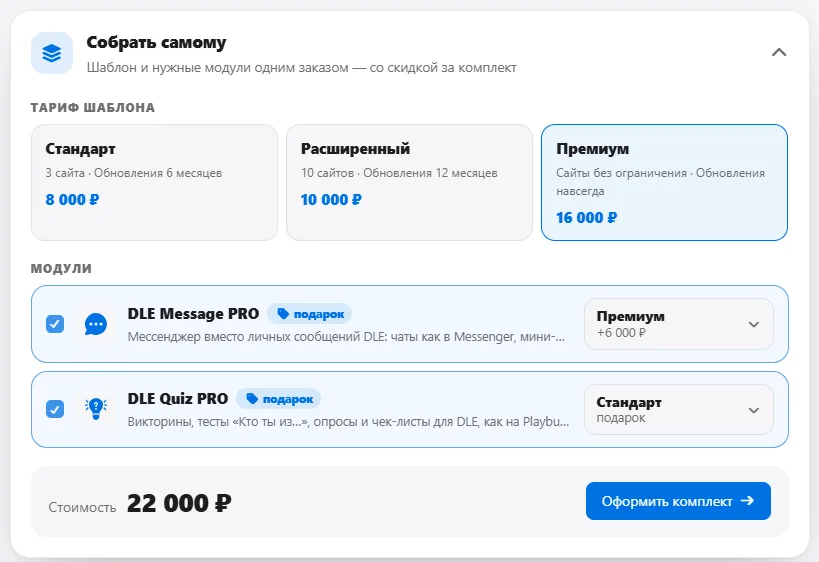
Отдельной рассрочки нет, но можно почти так же. Возьмите сейчас Расширенный за 10 000 ₽, в нём DLE Message PRO уже идёт в подарок. А в течение 30 дней можно перейти на Премиум в личном кабинете: уплаченное засчитывается полностью, доплатите только разницу 6 000 ₽.

dlemod Developer Алексей · edited

было бы неплохо🙂

Алексей dlemod

Неее, я просто видел тоже разработчиков, но они не на дле, а делают доску обьявлений. И там у них ИП и в способах оплаты CMS анный вид от яндекса) А так да, прикольная вещь, все прозрачно)))

Show 19 more discussions

Sign in to leave a comment.